2015年9月6日日曜日

Scene Recognition by Caffe


Introduction


 In this page, I perform a scene recognition by means of the library Caffe. It is shown that with the pre-training model that Caffe provides and its fine-tuning by scene images, the recognition accuracy achieves about 95% .

Computation Environment


 I used that instance g2.2xlarge in the Amazon EC2 which mounts the GPU device.

Dataset


 I trained the CNN using the dataset LSP15 in this page. The dataset consists of the 15 directories as follows:
  1. MITcoast
  2. MITforest
  3. MIThighway
  4. MITinsidecity
  5. MITmountain
  6. MITopencountry
  7. MITstreet
  8. MITtallbuilding
  9. bedroom
  10. CALsuburb
  11. industrial
  12. kitchen
  13. livingroom
  14. PARoffice
  15. store
The name of the directory represents the category of the scene. Each directory contains about 200 to 300 images which belong to their category.


Data Augmentation


 In order to augment dataset, I added the mirror images to it. Moreover, the images are split into two groups "train" and "test." The size of the image is 256 $\times$ 256, and the number of the channel is 3. The number of the images in each category is as follows:
                                   
label name number of train number of test
0 MITcoast 610 100
1 MIThighway 440 70
2 MITmountain 630 100
3 MITstreet 490 80
4 MITforest 550 90
5 MITinsidecity 520 80
6 MITopencountry 690 110
7 MITtallbuilding 600 100
8 bedroom 360 60
9 CALsuburb 400 60
10 industrial 520 80
11 kitchen 360 60
12 livingroom 490 80
13 PARoffice 360 60
14 store 540 90
7560 1220

Dataset for Caffe


 Caffe requires the following directories and files:
  1. a directory which contains training images
  2. a directory which contains test images
  3. a text file in which names and labels of training images are described
  4. a text file in which names and labels of test images are described
In my environment, they are put in the following paths:
  1. /home/ubuntu/data/caffe_256_15/train/
  2. /home/ubuntu/data/caffe_256_15/test/
  3. /home/ubuntu/data/caffe_256_15/train.txt
  4. /home/ubuntu/data/caffe_256_15/test.txt
The contents of the file "test.txt" are as follows:
MITstreet_image_0179_flipped.jpg 3
MITtallbuilding_image_0173_flipped.jpg 7
MITcoast_image_0126.jpg 0
store_image_0158_flipped.jpg 14
MITinsidecity_image_0102_flipped.jpg 5
MITforest_image_0200_flipped.jpg 4
industrial_image_0189_flipped.jpg 10
MITcoast_image_0142.jpg 0
kitchen_image_0019_flipped.jpg 11
bedroom_image_0210_flipped.jpg 8
bedroom_image_0116_flipped.jpg 8
livingroom_image_0008_flipped.jpg 12
kitchen_image_0051_flipped.jpg 11
MITstreet_image_0167_flipped.jpg 3
MITcoast_image_0315.jpg 0
....
The contents of the file "train.txt" are as follows:
industrial_image_0190.jpg 10
CALsuburb_image_0103_flipped.jpg 9
bedroom_image_0022_flipped.jpg 8
MITopencountry_image_0222.jpg 6
MITstreet_image_0040.jpg 3
MIThighway_image_0053_flipped.jpg 1
livingroom_image_0063_flipped.jpg 12
store_image_0106_flipped.jpg 14
industrial_image_0144.jpg 10
kitchen_image_0085_flipped.jpg 11
bedroom_image_0040.jpg 8
MIThighway_image_0088_flipped.jpg 1
industrial_image_0264.jpg 10
bedroom_image_0117_flipped.jpg 8
MITcoast_image_0021_flipped.jpg 0
...
After storing the images specified in the files "test.txt" and "train.txt" in the directories "test" and "train" respectively, this script is run to create the dataset for Caffe. "test_leveldb" and "train_leveldb" which are the inputs for Caffe are output as shown below.

Definition of CNN


 I defined the structure of the CNN in the file named "model/scene_recognition/train_val.prototxt" as: The file is based on the file "/home/ubuntu/buildspace/caffe-master/models/bvlc_reference_caffenet/train_val.prototxt." In the layers "data" and "fc8," there are differences between the original and my own files. I replaced the layer "fc8" with the new layer "scene_fc8." Moreover, in accordance with the explanation in this page, parameters in the layer "scene_fc8" were modified as shown above.

Definition of Solver


 Based on the file "models/bvlc_reference_caffenet/solver.prototxt," the text file used for training the CNN is defined as follows: The path of that file is "model/scene_recognition/solver.prototxt."

Training


 This script is run to train the CNN. The pre-training model which Caffe provides is "models/bvlc_reference_caffenet/bvlc_reference_caffenet.caffemodel" which is passed as the argument of the command option "-weights." The script fine-tunes the pre-training model by using the current dataset.

Result


The x-axis indicates the iteration number and the y-axis the recognition accuracy. Because in the current case the total iteration number is 80,000 and the solver is designed to output the accuracy once per 500 iterations, the maximum value of the x-axis is 160(=80,000/500). The recognition accuracy reaches about 95%.

Construction of Classifier


 After the training, the file "scene_train_iter_80000.caffemodel" is created. The file contains the information of the fine-tuned CNN. In order to construct the classifier from the model file, the following file is needed. That file is named "deploy.ptototxt." It is made from the file "model/scene_recognition/train_val.prototxt" according to the following procedures.
  1. Remove the layer "data," and add the four lines as shown below.
  2. Remove the layers "loss" and "accuracy", and add this layer.
The four lines with which the layer "data" is replaced means:
  1. input_dim: 20 --- batch size
  2. input_dim: 3 --- channel number
  3. input_dim: 227 --- width of an image
  4. input_dim: 227 --- height of an image
The code to classify the image is implemented as follows: It is named "classifier.py." Now I can classify the images.

2015年9月2日水曜日

Caffeによるシーン認識(8分類問題)2


はじめに


 先のページで caffeを使ってシーン認識(8分類問題)を試みた。今回は、caffe が提供する pre-training モデルを用いて、同じ問題を考察する。

計算機環境


 AmazonのEC2を利用した。インスタンス名は g2.2xlarge である。GPUを搭載したマシーンである。

データセット


 データセットは前回と同じである。ただし、pre-trainingモデルに合わせるため、画像サイズを256$\times$256に、チャンネル数を3に変更した。

caffe用データの作成


 ここも前回と同じである。 以下のコマンドにより caffe 用の入力データを作成する。 前回はグレー画像を扱ったのでコマンドオプションに -gray を付けたが、今回は3チャンネルなので -gray は付けない。

ネットワークの設計


 caffeのソースコードを納めたディレクトリ
/home/ubuntu/buildspace/caffe-master/models/bvlc_reference_caffenet
にある train_val.prototxt を下敷きにして以下のようなネットワーク構造を定義した(model/scene_recognition/train_val.prototxt)。 変更部分は、data 層と fc8 層の2つである(fc8 層を scene_fc8 層に置き換えた)。 また、このページの解説に従って、scene_fc8 層のパラメータ lr_mult を変更した。

solverの作成


 訓練を行なうためのテキストファイル model/scene_recognition/solver.prototxt を以下のように記述した。caffe の提供するサンプルファイル(models/bvlc_reference_caffenet/solver.prototxt)を下敷きにした。 現在の test 画像の枚数は730枚、batch size を10としたので73(=test_iter)回で一通り画像を走査することになる。また、testの実行はtrainを500(=test_interval)回まわすごとに行なうようにした。

訓練


 以下を実行する。 コマンドオプション -weights の引数として与えられている models/bvlc_reference_caffenet/bvlc_reference_caffenet.caffemodel がcaffeが提供するpre-trainingモデルである。上記のコマンドにより、大規模データであらかじめ作られた pre-training モデルを、私のデータで fine-tuning することができる。

結果


 以下に結果を示す。
test画像:
train画像:
縦軸はaccuracy(正解率)、横軸は iteration(繰り返し数)である。いまの場合、繰り返し数の総数が44238である。500回ごとにtest画像でテストするようにしたので、test画像の結果の横軸は89(=44238/500)まで表示されている。一方、 trainに対しては、73(=display)回ごとに出力するようにしたので、607(=44238/73)個の結果が表示されている。前回、test画像に対する正解率は88%であったが、今回は97%となり大幅に改善していることが分る。

検出器の作成


 ここまでの計算で、ファイル scene_train_iter_40000.caffemodel ができている。ここには、fine-tuning によりパラメータの確定したネットワーク構造が納められている。このファイルから検出器を作るには、以下のようなdeploy.prototxt ファイルが必要である。 これは、先に定義した model/scene_recognition/train_val.prototxt のデータ層を取り除き を追加し、最終層にある loss 層と accuracy 層を取り除き を追加したものである。データ層の代わりに挿入した input_dim の意味は以下の通りである。
  1. input_dim: 10 --- バッチサイズ
  2. input_dim: 3 --- 入力画像のチャンネル数
  3. input_dim: 227 --- 入力画像の幅
  4. input_dim: 227 --- 入力画像の高さ
検出器を使って、ファイルを識別するコードを以下に示す。 実行するとこうなる。 パーフェクトである。

2015年7月30日木曜日

Caffeによるシーン認識(8分類問題)


はじめに


 先のページで theano を使ってシーン認識(8分類問題)を試みた。今回は、caffe を取り上げ、同じ問題に適用する。

計算環境


 AmazonのEC2を利用した。インスタンス名は g2.2xlarge である。GPUを搭載したマシーンである。

データセット


 データセットは前回と同じである。
                     
ラベル 名前 枚数(train) 枚数(test)
0 MITcoast 610 100
1 MIThighway 440 70
2 MITmountain 630 100
3 MITstreet 490 80
4 MITforest 550 90
5 MITinsidecity 520 80
6 MITopencountry 690 110
7 MITtallbuilding 600 100
4530 730

これまでと同様に左右反転画像を追加してある。theano を用いた時は、データセットを train / validation / test の3つに分けたが、今回は train と validation を1つにまとめ改めて train とした。また、画像サイズは 126$\times$126 に変更し、画像の枚数も10で割り切れるよう調節した。

caffe用データの作成


 caffeが必要とするものは以下の4つである。
  1. train 画像を納めたディレクトリへのパス
  2. test 画像を納めたディレクトリへのパス
  3. train 画像名とラベルを記したテキストファイル
  4. test 画像名とラベルを記したテキストファイル
実行環境では、以下の場所にディレクトリとテキストファイルを作成した。
  1. /home/ubuntu/data/caffe/train
  2. /home/ubuntu/data/caffe/test
  3. /home/ubuntu/data/caffe/train.txt
  4. /home/ubuntu/data/caffe/test.txt
テキストファイルには、各行にファイル名とラベルを記述する。各ファイルの中身は以下の通りである。
test.txt
MITtallbuilding_image_0332_flipped.jpg 7
MITopencountry_image_0195.jpg 6
MITstreet_image_0176_flipped.jpg 3
MITmountain_image_0042.jpg 2
MITcoast_image_0195.jpg 0
MITmountain_image_0063_flipped.jpg 2
MITopencountry_image_0366_flipped.jpg 6
MITmountain_image_0229.jpg 2
MITtallbuilding_image_0354_flipped.jpg 7
MITforest_image_0086.jpg 4
MITcoast_image_0085.jpg 0
MITstreet_image_0094.jpg 3
MITopencountry_image_0401.jpg 6
MITmountain_image_0025_flipped.jpg 2
MITcoast_image_0075_flipped.jpg 0
MITforest_image_0227_flipped.jpg 4
....
train.txt
MITstreet_image_0253_flipped.jpg 3
MITcoast_image_0023.jpg 0
MITstreet_image_0256_flipped.jpg 3
MIThighway_image_0228_flipped.jpg 1
MITopencountry_image_0045_flipped.jpg 6
MITmountain_image_0314.jpg 2
MITtallbuilding_image_0078.jpg 7
MITmountain_image_0337.jpg 2
MITforest_image_0120.jpg 4
MITcoast_image_0088.jpg 0
MITmountain_image_0211_flipped.jpg 2
MITforest_image_0133_flipped.jpg 4
MITcoast_image_0356.jpg 0
MIThighway_image_0081_flipped.jpg 1
MITcoast_image_0115_flipped.jpg 0
MITmountain_image_0218_flipped.jpg 2
MITforest_image_0196_flipped.jpg 4
MITforest_image_0281_flipped.jpg 4
...
ディレクトリ内にテキストファイルに記述した画像を納め、以下のコマンドにより caffe 用の入力データを作成する。 以下の場所にデータベース test_leveldb と train_leveldb が出力される。

ネットワークの設計


 ここでは、caffeのサンプル(caffe-master/examples/mnist/lenet_train_test.prototxt)を下敷きにして以下のようなネットワーク構造を定義した(scene_train_test.prototxt)。

solverの作成


 訓練を行なうためのテキストファイル scene_solver.prototxt を以下のように記述する。caffe の提供するサンプルファイル(caffe-mater/examples/mnist/lenet_solver.prototxt)を下敷きにした。 現在の test 画像の枚数は730枚、batch size を10としたので73回で一通り画像を走査することになる。従って、73回ごとに正解率を出力するようにした。

訓練


 以下を実行する。

結果


 以下に結果を示す。
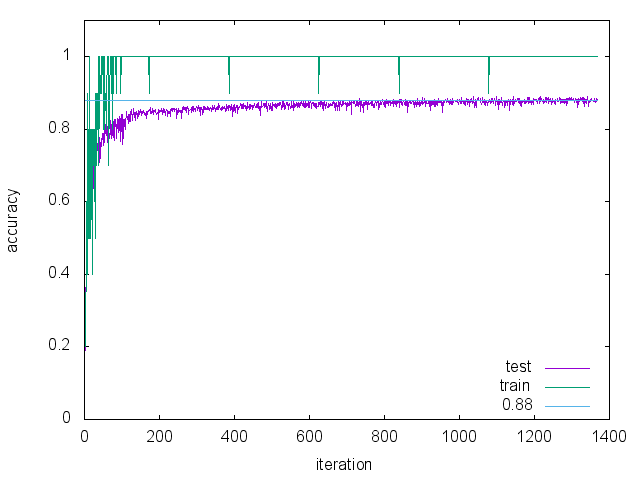
縦軸はaccuracy(正解率)、横軸は iteration(繰り返し数)である。いまの場合73回に1回ずつaccuracyを出力するので1370(=100000/73=1369.86...)個の値がプロットされる。 訓練画像については100%の正解率、テスト画像については88%程度の正解率である。

検出器の作成


 ここまでの計算で、ファイル snapshot_iter_100000.caffemodel ができている。ここには、訓練によりパラメータの確定したネットワーク構造が納められている。このファイルから検出器を作るには、以下のようなdeploy.prototxt ファイル(ここではscene_deploy.prototxtとした)が必要である。 これは、先に定義した scene_train_test.prototxt のデータ層を取り除き を追加し、最終層にある loss 層と accuracy 層を取り除き を追加したものである。データ層の代わりに挿入した input_dim の意味は以下の通りである。
  1. input_dim: 10 --- バッチサイズ
  2. input_dim: 1 --- 入力画像のチャンネル数
  3. input_dim: 126 --- 入力画像の幅
  4. input_dim: 126 --- 入力画像の高さ
検出器を使って、ファイルを識別するコードを以下に示す。 実行するとこうなる。1つ間違えている。

2015年4月29日水曜日

boost/range/adaptor 覚え書き

出力は以下の通り。

2015年4月2日木曜日

Convolutional Neural Network によるシーン認識


はじめに


 先のページで Convolutional Neural Network(CNN)を解説した。今回は、CNN をシーン認識に適用した結果を示す。

データセット


 このページに置いてある データ(LSP15)を使用した。このデータは15個のディレクトリから構成される。
  1. bedroom
  2. CALsuburb
  3. industrial
  4. kitchen
  5. livingroom
  6. MITcoast
  7. MITforest
  8. MIThighway
  9. MITinsidecity
  10. MITmountain
  11. MITopencountry
  12. MITstreet
  13. MITtallbuilding
  14. PARoffice
  15. store
各ディレクトリ内にはその名前が表すシーンの画像が複数枚おさめられている。 今回のシーン識別では「MIT」の付くディレクトリだけを利用した。画像の大きさが統一されており扱い易かったからである。今回あつかう問題は8分類問題である。

データセットの増量


 各シーンの画像の枚数は以下の通りである。

シーン名 枚数
MITcoast360(720)
MIThighway260(520)
MITmountain374(748)
MITstreet292(584)
MITforest328(656)
MITinsidecity308(616)
MITopencountry410(820)
MITtallbuilding356(712)
総数2688(5376)

画像の枚数を増やすため、各画像の左右反転画像を追加した。括弧内が追加後の枚数である。

データセットの分割


 データセットを train、validation、test の3つに分割する。枚数の比を train : validation : test = 5 : 1 : 1 とした。 以下に具体的な枚数を示す。
 
ラベル名 シーン名 train validation test
0MITcoast514102102
1MIThighway3717474
2MITmountain534106106
3MITstreet4178383
4MITforest4689393
5MITinsidecity4408888
6MITopencountry585117117
7MITtallbuilding508101101
総数3837764764

また、シーン認識時に使用するラベルを上図の第1列のように定義した。 左右反転画像は元の画像とは独立した画像として扱い、train / validation / test の3つに分ける際は乱数を用いた。

ネットワークの構造


 今回使用したネットワークの構造は以下の通りである。
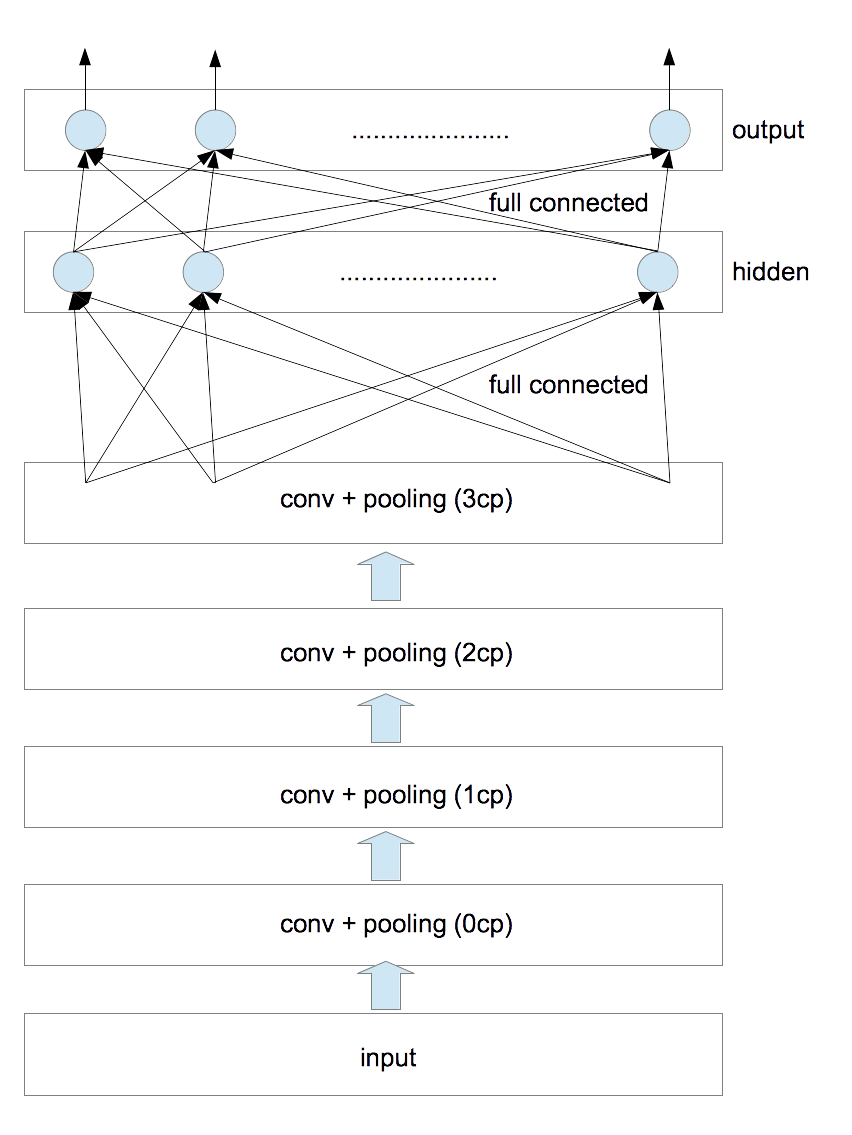
convolutional 層と pooling 層の対を4つ、隠れ層を1つとした。 各種パラメータは以下の通りである。
           
層名 フィルタサイズ フィルタの個数 pooling
0cp 5$\times$5 2 2$\times$2
1cp 6$\times$6 10 2$\times$2
2cp 6$\times$6 50 2$\times$2
3cp 5$\times$5 200 2$\times$2

フィルタサイズとは、convolution 時に使用する矩形画像のサイズのことである(フィルタの各要素の値は訓練時に決定される)。また、convolution時の stride は全て1とした。poolingはmax poolingを採用した。poolingのあと画像サイズは縦横ともに1/2になる。 隠れ層と出力層のユニット数は以下の通りである。
         
層名 ユニット数
隠れ層500
出力層8

各層における画素数の変遷は次のようになる。
           
層名 入力サイズ conv後のサイズ pooling後のサイズ
0cp 146$\times$146 142$\times$142 71$\times$71
1cp 71$\times$71 66$\times$66 33$\times$33
2cp 33$\times$33 28$\times$28 14$\times$14
3cp 14$\times$14 10$\times$10 5$\times$5

0cp層への入力画像に対しては、画素値を255で割ったあと、平均値が0、分散が1となるように正規化した。 3cp層から出力される画素の数は5000=(5$\times$5$\times$200)である。これが隠れ層への入力値となる。今考えているラベルの総数は8であるから出力層のユニット数は8となる。

計算方法


 Convolutional Neural Networks (LeNet) にあるサンプルソース(theanoによる実装)に手を加え計算を行なった。主な変更点は以下の通りである。
  1. 上に示したネットワーク構造に変更した。
  2. $L_1$正則化項と$L_2$正則化項を追加した。
  3. 各epochごとに学習率が減衰していくようにした。
  4. 隠れ層の活性化関数をsigmoidとした(tanhより精度が良くなった)。
正則化項についてはこちらで説明した。 パラメータは以下の通りである。
   
学習率減衰率 $L_1$正則化項の重み $L_2$正則化項の重み
0.01 0.995 0.0002 0.0002

元のソースでは、early-stoppingと呼ばれる手法を使って訓練を行っている。「訓練データ(train)で学習したあと検証データ(validation)で誤り率を見る」を、検証データで改善が見られなくなるまで繰り返す手法である。この部分はそのまま踏襲した。

計算環境


 アマゾンのEC2インスタンス(g2.2xlarge)を利用した。これは1536CUDA コアと 4GB のビデオメモリを搭載しており、今回の計算ではtheanoを通してGPUを利用した。

結果


 0/1損失(0/1 loss)の結果を以下に示す。
   
best validation score test performance
11.9736842105%10.6578947368%

ここで、best validation score とは、early-stopping の反復計算の過程で得られた「検証データ」に対する最適値である。 「検証データ」に対する最適値を実現したときのモデルを使って「テストデータ」を評価した結果が test performance である。 ただし、反復時の epoch 数の上限値を500とした。計算時間は 182.905974067 分であった。

考察

  1. 左右反転画像を追加する前の誤り率は20%程度であり、これ以上減らすことができなかった。
  2. 左右反転画像を追加した後の誤り率は10%程度となり改善された。
  3. 白色化や隠れ層の追加などを試みたがこれ以上は改善しなかった。
  4. なんとかして誤り率を一桁にしたいのだが。。。

2015年2月26日木曜日

正則化項について


はじめに


 これまでいくつかのNeural Networkを考察してきた( 1次元ロジスティック回帰、 多次元ロジスティック回帰、 多層パーセプトロン、 Convolutional Neural Network)。 どの場合もパラメータを求める際はNegative Log Likelihood(NLL)を最小化した。過学習を防ぐため、正則化項(regularization term)と呼ばれる項をNLLに追加することがある。ここでは、この正則化項の役割についてまとめる。

正則化項


 多次元ロジスティック回帰を例として考える。全観測値の実現確率は次式で与えられた。 \begin{equation} P(W,\vec{b})=\prod_{n=1}^{N}\;p(c^{n}\;|\;\vec{x}^{\;n}\;;\;W,\vec{b}) \end{equation} ここで、$\vec{x}^{\;n}$ は観測値、$c^{n}$ はラベル、$W,\vec{b}$ はモデルを調節するパラメータである。上式におけるパラメータは確率変数とは無関係な量として定義したが、これも確率変数とみなし以下のように事前確率 $p(W,\vec{b})$ を導入することができる。 \begin{equation} P(W,\vec{b})=\prod_{n=1}^{N}\;p(c^{n}\;|\;\vec{x}^{\;n}\;;\;W,\vec{b})\;p(W,\vec{b}) \end{equation} すなわち、パラメータが確率 $p(W,\vec{b})$ で与えられたときの観測値の実現確率を考えるのである。 両辺の対数をとりマイナスを付ける。 \begin{eqnarray} L(W,\vec{b})&=&-\ln{P(W,\vec{b})}\nonumber \\ &=&-\sum_{n=1}^{N}\;\ln{p(c^{n}\;|\;\vec{x}^{\;n}\;;\;W,\vec{b})}-\ln{p(W,\vec{b})} \label{nll} \end{eqnarray} これまで考えてきたNLLに $-\ln{p(W,\vec{b})}$ が付加されることが分る。これが正則化項である。 $p(W,\vec{b})$ として以下の形の正規分布を考えることが多い。 \begin{equation} p(W,\vec{b}) = \exp{\left(-\eta \sum_{i,j}\;|w_{i,j}|^2\right)} \end{equation} ここで、$w_{i,j}$ は $W$ の成分、$\eta$ は正の量である。このとき $L(W,\vec{b})$ は以下のようになる。 \begin{equation} L(W,\vec{b})=-\sum_{n=1}^{N}\;\ln{p(c^{n}\;|\;\vec{x}^{\;n}\;;\;W,\vec{b})}+\eta \sum_{i,j}\;|w_{i,j}|^2 \end{equation} 上式を最小化する過程で、右辺第2項は $w_{i,j}$ を小さくする力となる。すなわち、正則化項はNeural Networkのユニット間の結びつきを 弱めるものであり、これが過学習を抑制するのである。上記のように $|w_{i,j}|$ の2乗のものを $L_2$ 正則化項、1乗のものを $L_1$ 正則化項と呼ぶ。

2015年2月9日月曜日

Convolutional Neural Network


はじめに


 先のページでは多層パーセプトロンを解説した。今回は、これを拡張することによりConvolutional Neural Networkを導く。

多層パーセプトロン


 隠れ層が一層の多層パーセプトロンは以下のような構造であった。
これに対応する式は以下のように与えられる。 \begin{eqnarray} y_k &=& \pi\left(\;f_k\left( \vec{z}; W^{(2)},\vec{b}^{\;(2)}\right)\;\right) \label{eprob-2}\\ \pi(a_k) &=& \frac{\exp{(a_k)}} {\sum_{j=1}^{K}\;\exp{(a_j)}} \label{softmax-1}\\ \vec{f}\left( \vec{z}; W^{(2)},\vec{b}^{\;(2)}\right) &=& W^{(2)\;T}\;\vec{z} + \vec{b}^{\;(2)}\label{projection-2} \end{eqnarray} \begin{eqnarray} z_h &=& \tanh\left(\;g_h\left( \vec{x}; W^{(1)},\vec{b}^{\;(1)}\right)\;\right) \label{eprob-1}\\ \vec{g}\left( \vec{x}; W^{(1)},\vec{b}^{\;(1)}\right) &=& W^{(1)\;T}\;\vec{x} + \vec{b}^{\;(1)}\label{projection-1} \end{eqnarray} ここで、$W^{(1)}$ は $D\times H$ 行列、$\vec{b}^{\;(1)}$ は $H$ 次元ベクトル、$W^{(2)}$ は $H\times K$ 行列、$\vec{b}^{\;(2)}$ は $K$ 次元ベクトルである。ただし、隠れ層の活性化関数として $\tanh{}$ を採用している。 最下層は入力層であり $D$ 個のユニットから構成される。隠れ層のユニット数は $H$ 個、最上層は出力層であり $K$ 個のユニットから構成される。これを適用する具体例として、$D$ 次元のベクトルとして与えられる観測値を $K$ 個のクラスのいずれかに分類する多分類問題を挙げることができる。
 上図における層間の接続に注目したものが下図である。各ユニットは、下層の全ユニットと接続している。

Convolutional Neural Network(CNN)


 いま、入力層(input layer)と隠れ層(hidden layer)の間に複数の層を挿入する。
上図は、convolution layerと pooling layerの対を2つ挿入したものである。 一般に、この対を任意の数だけ挿入したものをconvolutional neural networkと呼ぶ。以下各層について説明する。

① convolution layer

 多次元ロジスティック回帰や多層パーセプトロンでは、1次元のベクトルを入力値としてきたが、ここでは入力値として2次元ベクトルを考える。具体的には画像が入力値となる場合を考察する。まず最初に、$m$ 番目の入力画像の $l$ 番目のチャンネルを考え、位置 $(i,j)$ にある画素 $x_{m,l,i,j}$ について以下の計算を行なう。 \begin{equation} g_{m,k,i,j} = \sum_{p,q,l} \; w_{k,l,p,q}\;x_{m,l,i+p,j+q} \label{eq1} \end{equation} これは、矩形のフィルタ $w_{k,l}$ を使って convolution を行い、$l$ について和をとることと等価である。カラー画像なら $l$ の総数は3、グレースケールなら1である。convolution を $\circledast$ で表すことにすれば、式(\ref{eq1})は \begin{equation} g_{m,k} = \sum_{l} \; w_{k,l} \circledast x_{m,l} \label{eq2} \end{equation} と書くことができる。

② max pooling

 次に行なう処理は pooling である。pooling の方法にはいくつかあるが、ここでは max pooling を取り上げる。max pooling とは、 画像を $a\times a$ の領域に細分し、各領域内の最大値でその領域を代表させる処理である。$a=2$ なら $w\times h$の画像は$w/2\times h/2$ のサイズにダウンサンプリングされる。いま形式的に max pooling の処理を $p_{\rm{pooling}}(\cdot)$ と書くことにすれば、この処理の出力値は \begin{equation} q_{m,k} = p_{\rm{pooling}}\left(\sum_{l} \; w_{k,l} \circledast x_{m,l}\right) \label{eq3} \end{equation} となる。

③ 活性化関数

 ここまでの出力値 $q_{m,k}$ にスカラー量であるバイアス項 $b_{k}$ を加え、$\tanh$ で活性化する。 \begin{equation} r_{m,k} = \tanh{(q_{m,k}+b_k)} \label{eq4} \end{equation} 出力値 $r_{m,k}$ は、feature mapと呼ばれる。これを新たな入力値 $x_{m,l}$ とみなして ①②③ の処理を繰り返す。その際、フィルタの数 $k$ を変えることができる。たとえば、最初の処理①②③では20種類のフィルタを使い、次の処理①②③では50種類のフィルタを使うなどである。

 convolution layerとpooling layerの対が2つ、最初の画像サイズが28$\times$28、フィルタサイズが5$\times$5の場合を考える。最初のconvolution layerにより画像サイズは 24$\times$ 24となり、それに引き続く pooling layer により画像サイズは12$\times$12となる。次のconvolution layerへの入力画像のサイズは12$\times$ 12となり、フィルタサイズが最初と同じなら、convolution layerにより画像サイズは8$\times$8、pooling layerにより画像サイズは4$\times$4となる。2つ目のcovolution に使うフィルタの数が50なら、4$\times$4の画像が50個出来上がる。すなわち、1枚の画像(サイズは28$\times$28)から50組の16(=$4\times 4$)画素が作成される。この画素を一列に並べた800($=50\times 16$)次元のベクトルを多層パーセプトロンのhidden layerの入力とみなす。あとの処理は先のページと同じである。

計算を行なう際の留意点

  • CNNの計算量はMLPと比べ著しく多くなる。 私のiMac(3.06GHz Intel Core 2 Duo, 4GB)で、参考文献にあるtheanoコードを実行したところ、MLPで8.32時間、CNNで20.99時間となった。0-1lossの値は、MLPで1.68%、CNNで0.91%であった。
  • 各層の計算時間を同じにするため、(feature mapの数$\times$feature mapを構成する画素の数)を各層でほぼ同じにすることがよく行なわれる。
  • 考察するデータセットごとに最適なフィルタサイズは変わる。入力画像が28$\times$28程度であれば5$\times$5のフィルタがよく使われる。一方、数百画素$\times$数百画素の画像に対しては12$\times$12や15$\times$15程度のフィルタを用いることが多い。
  • max poolingを行なわない選択肢もある。行なうとしても、そのサイズは2$\times$2が限度である。これ以上のdownsamplingを行なうと、多くの情報が失われてしまう。
  • whitening(白色化)を導入することにより識別率は高くなる。
  • 確率的勾配降下法の各イテレーションごとに学習率を小さくすることにより収束速度を上げることができる。

まとめ


 多次元ロジスティック回帰は入力層と出力層の2層からなるNeural Network、多層パーセプトロンはこの2層の間に隠れ層を複数個挿入したNeural Network、そして、Convolutional Neural Networkは、多層パーセプトロンにconvolution層とpooling層の対を複数個挿入したNeural Networkである。多分類問題に適用した際の識別率は、一般的には、入力層と出力層の間の中間層が増える程高くなる。
 

参考文献


Convolutional Neural Networks (LeNet)
Theanoを使った実装が掲載されている。