2016年3月22日火曜日

Fully Convolutional Networks 〜 Chainerによる実装 〜

in English

はじめに


 先のページで Chainer を用いてシーン認識を行った。今回は、簡略化した Fully Convolutional Networks(FCN) を Chainer を使って実装してみる。(ここに追記した。)

計算機環境


 これまでと同じく、Amazon EC2 にある g2.2xlarge を利用した。GPU を搭載したインスタンスである。

データセット


 今回使うデータセットは VOC2012 である。以下のような領域分割用の教師データも含まれている。
領域分割の教師データの数は2913枚、これを4:1に分割し、前者を訓練データ、後者をテストデータとした。

number of train number of test
2330 580

訓練データ数は10で、テストデータ数は5で割り切れるように端数を切り捨てた(それぞれ訓練時のミニバッチサイズである)。文献のアルゴリズムは任意サイズの画像を受け付けるが、ここでの実装では、簡単のため、固定サイズ(224$\times$224)に制限した。これに伴い、入力画像をあらかじめこのサイズに変換した。
画像の中心部分に収まる最大の正方形をリサイズしただけである。VOC2012では、以下の21クラスを扱う。

label category
0 background
1 aeroplane
2 bicycle
3 bird
4 boat
5 bottle
6 bus
7 car
8 cat
9 chair
10 cow
11 diningtable
12 dog
13 horse
14 motorbike
15 person
16 potted plant
17 sheep
18 sofa
19 train
20 tv/monitor

ネットワークの構造


 ネットワークの構造は以下の通りである。文献では、pool5 の後ろにも層は存在するが、簡単化のため、これらを削除した。
  1. name: 層の名前
  2. input: 入力featureマップの1辺のサイズ
  3. in_channels: 入力featureマップ数
  4. out_channels: 出力featureマップ数
  5. ksize: カーネルのサイズ
  6. stride: ストライドのサイズ
  7. pad: paddingのサイズ
  8. output: 出力featureマップの1辺のサイズ
pool3、pool4、pool5 の出力に接続する層を以下に示す。これらの層を通ったあとの出力データ名をp3、p4、p5とする。これら3つのデータのfeatureマップの数はクラスの数に等しくなる。
featureマップを拡大する層(Deconvolution層)は以下の通りである。
p4にupsample_pool4が、p5にupsample_pool5が適用され、これら2つのデータとp3とが加算され、最後にupsample_finalで元画像のサイズに拡大される。これで文献の FCN-8s に相当するものが出来上がる。

ネットワークの実装


 上記の構造をそのままChainerで記述する。

-- myfcn.py -- ラベルは0から20までであるが、物体の境界線には-1を配置し、softmax_cross_entropyの計算時に境界の寄与を無視するようにした(Chainerの仕様ではラベルが-1の画素は評価されない)。また、関数calculate_accuracyでも、境界線上の画素を省くようにしてある。3つのデータを加算する関数 add の定義は以下の通りである。

-- add.py --

訓練


 訓練時のスクリプトは以下の通りである。

-- train.py -- -- mini_batch_loader.py --
関数 copy_model はここに掲載されているものを利用した。VGGNet.pyはここからダウンロードした。train.pyでしていることは、
  1. オブジェクトmini_batch_loaderを作る。
  2. VGGNet.pyで定義されたネットワークのオブジェクトを作る。
  3. MyFcn.pyで定義されたネットワークのオブジェクトを作る。
  4. VGGNetのパラメータをMyFcnにコピーする。
  5. 最適化アルゴリズムとして MomentumSGD を選択する。
  6. あとは、通常の訓練過程である。
データを一括読み込みすると、ビデオメモリーが足りなくなるので、要求されるごとに読み込むようにしてある。

結果


 62エポックで計算を打ち切った。学習時の精度と損失は以下の通りである。

-- 訓練画像--
-- テスト画像 --
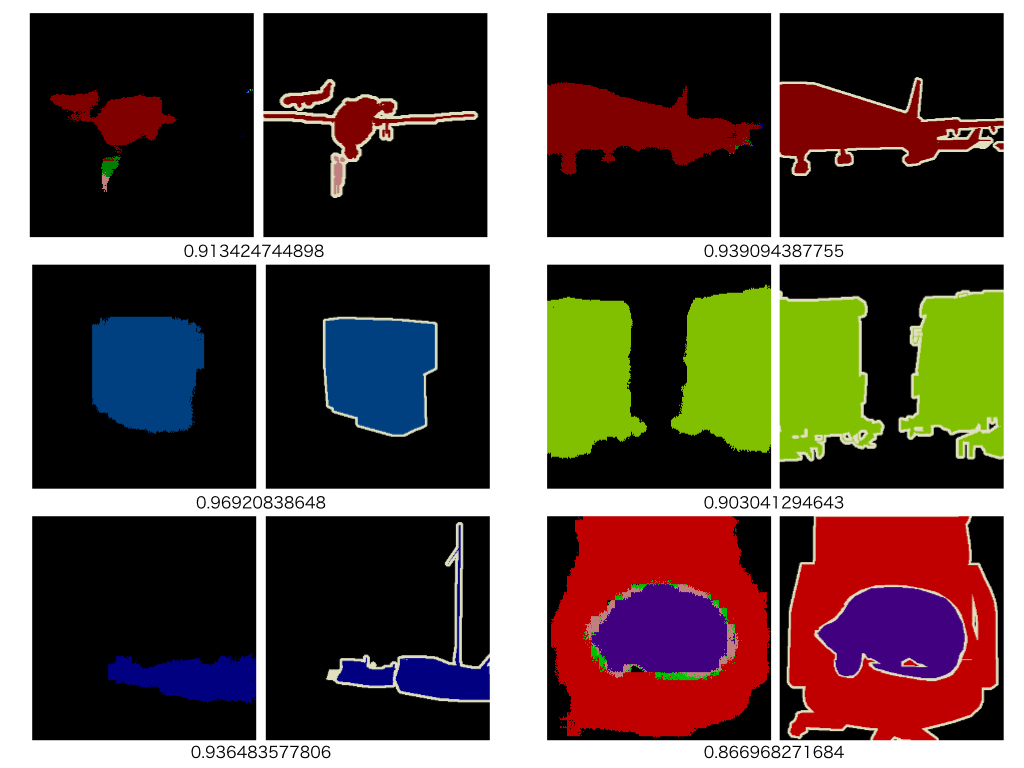
1枚の画像の中で何%の画素が正解したかを計算し(境界線上の画素は除く)、全画像について平均したものを正解率(accuracy)と定義した。訓練画像に対しては理想的な振る舞いを示すが、テスト画像に対しては損失が途中から上昇し始めている。過学習しているように見える。最終的な正解率は、訓練画像で0.99、テスト画像で0.82程度である。以下に入力画像、予測画像、教師画像の例を示す。数値はこの画像の正解率である。
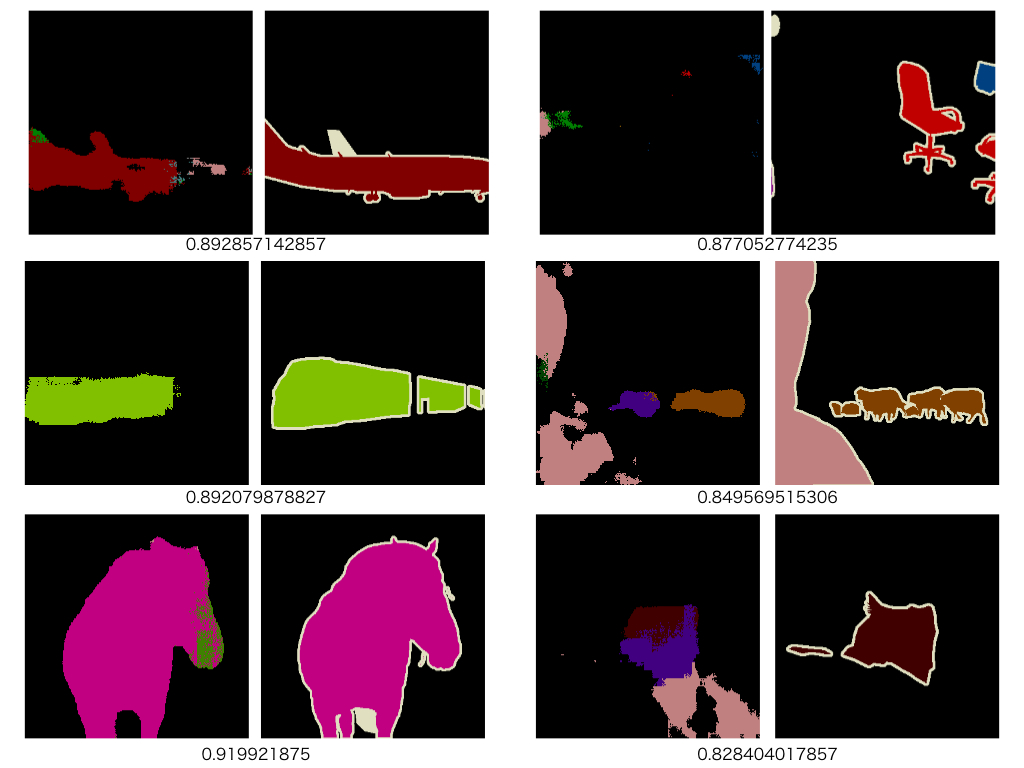
以下に、その他の画像の予測例を示す。予測画像と教師画像を並べてある。

-- 訓練画像--

-- テスト画像--
背景で精度を稼いでしまうので、満足の行く結果とするには90%以上の精度を実現する必要がある。

2016年2月6日土曜日

Chainer によるシーン認識

in English

はじめに


 先のページで Caffe を使ったシーン認識(15分類問題)を試みた。今回は、Caffe の学習済みモデルを Chainer を使って Fine-Tuning することにより同じシーン認識を行ってみる。

計算機環境


 これまでと同じく、Amazon EC2 にある g2.2xlarge を利用した。GPU を搭載したインスタンスである。

データセット


 先と同じ LSP15 を利用する。このデータセットは15個のディレクトリから構成されている。
  1. MITcoast
  2. MITforest
  3. MIThighway
  4. MITinsidecity
  5. MITmountain
  6. MITopencountry
  7. MITstreet
  8. MITtallbuilding
  9. bedroom
  10. CALsuburb
  11. industrial
  12. kitchen
  13. livingroom
  14. PARoffice
  15. store
ディレクトリ名はシーンのカテゴリを表している。各ディレクトリは200〜300枚程度の画像を含む。

データセットの増量


 左右反転画像を追加する。そのあと、データセットを 6:1 に分割し、前者を訓練画像、後者をテスト画像とした。最終的な画像の枚数は以下の通りである。

label name number of train number of test
0 MITcoast 610 100
1 MIThighway 440 70
2 MITmountain 630 100
3 MITstreet 490 80
4 MITforest 550 90
5 MITinsidecity 520 80
6 MITopencountry 690 110
7 MITtallbuilding 600 100
8 bedroom 360 60
9 CALsuburb 400 60
10 industrial 520 80
11 kitchen 360 60
12 livingroom 490 80
13 PARoffice 360 60
14 store 540 90
7560 1220

画像の中心部分から最大の正方形を取り出し、このサイズを $256 \times 256$ に変更した。画像へのパスとラベルを記したテキストファイルを以下のように作成した。

--- test.txt ---
--- train_valid.txt ---

Caffe モデルの読み込みと保存


 今回は Caffe が提供するモデル bvlc_reference_caffenet.caffemodel を利用した。以下のコードで読み込む。 CaffeFunction による読み込みは時間がかかる処理である。cPickle を使って保存し直しておく。

ネットワークの実装


 今回使用する Caffe モデルと等価なネットワークを Chainer を使って再現する。bvlc_reference_caffenet.caffemodel と一緒に配布されるprototxt を見ながら実装すれば良い。Chainer のソースコードに含まれるサンプル(chainer-1.6.0/examples/imagenet/alex.py)をベースにした。

--- reference_caffenet.py ---
このネットワークの一番上にある fc8 層の名前を scene_fc8 に、この層の出力ユニット数を 1000 から 15 に変更する。変更後のクラスを以下に示す。

--- modified_reference_caffenet.py ---

Fine-Tuning


 pickle で保存した Caffe モデルは、L.Convolution2D と L.Linear のオブジェクトを含んでおり、それらは $W$ と $b$ の学習済みパラメータを持っている。上で定義したクラス ModifiedReferenceCaffeNet は scene_fc8 以外の層は Caffe モデル と同じあるから、{conv1, conv2, conv3, conv4, conv5, fc6, fc7} が持つ $W$ と $b$ をそのままModifiedReferenceCaffeNet 側にコピーする。そのあと、今回のデータセットで学習を行えば Fine-Tuning を実現できる。

訓練


 訓練時のコードを以下に示す。

--- train.py ---
  1. 15行目:先に保存した Caffe モデルへのパス
  2. 16行目:Fine-Tuning後のモデルを保存するファイルへのパス
  3. 17行目:平均画像へのパス
  4. 21行目:学習率
  5. 22行目:ミニバッチサイズ
  6. 23行目:エポック数
  7. 24行目:学習率のエポックごとの減衰率
  8. 29行目:訓練データへのパス
  9. 30行目:テストデータへのパス
  10. 33〜45行目:def test: テストデータを使った loss と accuracy の計算。全データの平均値を取る。
  11. 52〜63行目:データの読み込み。クラス DataLoader については後述。
  12. 75行目:Caffe モデルを読み込む。
  13. 78行目:今回使うネットワークのオブジェクトを作る。
  14. 81行目:学習済みパラメータ $W$ と $b$ をコピーする。最終層 scene_fc8 の $W$ と $b$ はデフォルト値に初期化されている。関数 copy_model については後述。
  15. 85行目:今回使うネットワークのオブジェクトを GPU 側へ転送。
  16. 86行目:最適化アルゴリズムとして確率的勾配降下(SGD)法を選択する。
  17. 87行目:最適化アルゴリズムに最適化すべき対象を渡す。
  18. 93〜115行目:Fine-Tuning のためのループ
  19. 123行目:Fine-Tuning 後のモデルを保存する。
クラス DataLoader を定義したファイルは以下の通り。

--- data_loader.py ---

--- image_cropper.py ---
関数 copy_model についてはこちらのページに掲載されているものを使用した。
--- copy_model.py ---


訓練結果


 以下に訓練データとテストデータの正解率と損失を示す。

訓練データ
テスト画像

テスト画像に対する正解率は96.23%である。

識別器の作成


 識別器のコードは以下の通り。本来であればこれを使って訓練すべきである。訓練をやり直すには時間とお金がかかるので今回は再度 copy_model を使うことにした。

--- modified_reference_caffenet_with_predictor.py ---
識別する際のコードは以下のようになる。

--- predict.py ---
  1. 12行目:テストデータへのパス
  2. 13行目:平均画像へのパス
  3. 14行目:Fine-Tuning 後のモデルへのパス
  4. 18行目:モデルの読み込み
  5. 21行目:識別器の作成
  6. 24行目:パラメータのコピー
  7. 27〜32行目:テストデータの読み込み
  8. 35〜40行目:テストデータの数を減らして Variable オブジェクトに格納
  9. 43,44行目:識別する。
実行結果は以下の通り。 一番最初の画像だけ間違っている。

特徴抽出器の作成


 fc7層から特徴ベクトルを抽出する。コードは以下の通り。

--- modified_reference_caffenet_with_feature_extractor.py ---
このクラスを使って、特徴ベクトルを抽出し、liblinear の入力ファイルを作成する。コードは以下の通り。

--- extract.py ---
  1. 59行目:Fine-Tuning したモデルを読み込む。
  2. 62行目:抽出器を作る。
  3. 65行目:Fine-Tuning したモデルから抽出器へパラメータをコピーする。
  4. 70,71行目:liblinear への入力ファイルを作る。

SVMの実行


 以下のコードで訓練。 以下のコードで予測。 既に示したように Softmax 層を使った時は 96.23% であったから 1% ほど良くなっている。

2016年1月27日水曜日

Softmax関数とシグモイド関数のこと 〜確率との関係〜

 いま、観測量$\vec{x}$がラベル$\{c_{k}\},k=1,\cdots,K$のいずれかに属している問題を考える。$\vec{x}$が実現する確率$p(\vec{x})$は \begin{equation} p(\vec{x})=\sum_{k=1}^{K} p(\vec{x}, c_{k}) \end{equation} と書くことができる。ここで、 $p(\vec{x}, c_{k})$は$\vec{x}$と$c_{k}$が同時に実現する確率である。Bayesの定理から上式の右辺は \begin{equation} p(\vec{x})=\sum_{k=1}^{K} p(\vec{x}| c_{k})\;p(c_{k}) \label{d0} \end{equation} と変形することができる。ここで、$p(\vec{x}| c_{k})$は$c_{k}$が実現しているとき$\vec{x}$が実現する事後確率、$p(c_{k})$は事前確率である。次に、$\vec{x}$が実現しているときラベルが$c_k$である事後確率を考える。Bayesの定理と式($\ref{d0}$)より \begin{eqnarray} p(c_k|\vec{x})&=&\frac{p(\vec{x}, c_{k})}{p(\vec{x})} \\ &=&\frac{p(\vec{x}| c_{k})p(c_k)}{\sum_{i} p(\vec{x}| c_{i})\;p(c_{i})} \\ &=&\frac{ {\rm e}^{a_k} }{\sum_{i} {\rm e}^{a_i}} \label{e0} \end{eqnarray} を得る。ここで \begin{eqnarray} a_k&=&\ln\left(p(\vec{x}| c_{k})p(c_k)\right) \\ &=&\ln p(\vec{x},c_{k}) \end{eqnarray} とした。式($\ref{e0}$)がSoftmax関数である。先に考えた多次元回帰では、計算の順序として最初に$a_{k}$が計算され、Softmax関数を使って確率に変換していた。$a_{k}$とは$\vec{x}$と$c_k$が同時に実現する確率$p(\vec{x},c_k)$の対数である。

 2分類の場合、式($\ref{e0}$)は \begin{equation} p(c_1|\vec{x})=\frac{ {\rm e}^{a_1} }{{\rm e}^{a_1}+{\rm e}^{a_2}} \end{equation} となる。ここで \begin{eqnarray} b&\equiv&a_1-a_2 \\ &=&\ln{\frac{p\left(\vec{x},c_1\right)}{p\left(\vec{x},c_2\right)}}\\ &=&\ln{\frac{p\left(c_1|\vec{x}\right)}{p\left(c_2|\vec{x}\right)}} \label{e1} \end{eqnarray} を導入すると \begin{equation} p(c_1|\vec{x})=\frac{1}{1+{\rm e}^{-b}} \end{equation} を得る。これはシグモイド関数である。先の1次元回帰では最初に$b$を求め、この関数により確率に変換した。

 シグモイド関数 \begin{equation} \sigma=\frac{1}{1+{\rm e}^{-b}} \end{equation} を$b$について解いた式 \begin{equation} b=\ln{\left(\frac{\sigma}{1-\sigma}\right)} \end{equation} をlogit関数と呼ぶ。

2016年1月26日火曜日

Softmax関数とシグモイド関数のこと

1次元ロジスティック回帰では以下のシグモイド関数を用いた(参照)。 \begin{equation} f_{\rm SI}(a)=\frac{1}{1+{\rm e}^{-a}} \end{equation} この式により任意の実数$a$は確率に変換される。この回帰の目的は$N$個の多次元ベクトル $\vec{x}_{i},i=1,\cdots,N$ を2分類することである。一方、多次元ロジスティック回帰では、Softmax関数 \begin{equation} f_{\rm SO}(a_{k})=\frac{{\rm e}^{a_{k}}}{\sum_{i=1}^{M}{\rm e}^{a_{i}}} \end{equation} が使われていた(参照)。この回帰の目的は$N$個の多次元ベクトル $\vec{x}_{i},i=1,\cdots,N$ を$M$分類することである。先と同様に、$M$個の実数$a_{k},k=1,\cdots,M$ はこの式により確率に変換されることになる。以下が成り立つ事に注意する。 \begin{equation} \sum_{k=1}^{M}\;f_{\rm SO}(a_{k})=1 \end{equation} それでは、$M$が$2$のとき上記のSoftmax関数とシグモイド関数はどのように対応付けられるのであろうか?

$M=2$のとき \begin{equation} f_{\rm SO}(a_{1})=\frac{{\rm e}^{a_{1}}}{{\rm e}^{a_{1}}+{\rm e}^{a_{2}}} \label{eq1} \end{equation} となる。$f_{\rm SO}(a_{2})$は$1-f_{\rm SO}(a_{1})$から求める事ができるので$f_{\rm SO}(a_{1})$だけを考える。式($\ref{eq1}$)変形すると、 \begin{eqnarray} f_{\rm SO}(a_{1})&=&\frac{1}{1+{\rm e}^{-\left(a_{1}-a_{2}\right)}}\\ &=&f_{\rm SI}(a_{1}-a_{2}) \end{eqnarray} を得る。すなわち、2変数の場合はその差だけでSoftmax関数を記述することができる。$a_{1}-a_{2}$を改めて$a$とおけばシグモイド関数に帰着する。$a_1 \gg a_2$は$a$が十分大きいことに対応し、$a_1 \ll a_2$は$a$が十分小さいことに対応する。

2016年1月24日日曜日

UbuntuにHaskellをインストールする手順

macportsでは でこけました。

2016年1月22日金曜日

Chainerチュートリアルの覚え書き

Chainerのチュートリアルの中程に以下の記述がある。 上記のf.W.gradとf.b.gradを導出する。

計算される量は \begin{equation} Y = WX+B \end{equation} 成分を取ると \begin{equation} y_{i m} = \sum_{j}w_{i j}x_{j m}+b_{i} \end{equation} $w_{\alpha \beta}$で微分を取ると \begin{eqnarray} \frac{\partial y_{i m}}{\partial w_{\alpha \beta}} &=& \sum_{j} \delta_{i \alpha}\delta_{\beta j} x_{j m} \\ &=&\delta_{i \alpha}x_{\beta m} \end{eqnarray} 両辺 $i,m$ で和を取ると \begin{eqnarray} \sum_{im}\frac{\partial y_{im}}{\partial w_{\alpha \beta}} &=& \sum_{im}\delta_{i\alpha}x_{\beta m} \\ &=&\sum_{m}x_{\beta m} \end{eqnarray} この値を $\delta w_{\alpha \beta}$ と置く。 \begin{equation} \delta w_{\alpha \beta}=\sum_{m}x_{\beta m} \end{equation} いま $m=(0,1)$ であるから \begin{equation} \delta w_{\alpha \beta}= x_{\beta 0}+x_{\beta 1} \end{equation} $\beta=(0,1,2)$ であるから \begin{eqnarray} \delta w_{\alpha 0}&=&x_{0 0}+x_{0 1} \\ \delta w_{\alpha 1}&=&x_{1 0}+x_{1 1} \\ \delta w_{\alpha 2}&=&x_{2 0}+x_{2 1} \end{eqnarray} $(x_{0 0},x_{1 0},x_{2 0})=(1,2,3)$, $(x_{0 1},x_{1 1},x_{2 1})=(4,5,6)$ であるから \begin{eqnarray} \delta w_{\alpha 0}&=& 5\\ \delta w_{\alpha 1}&=& 7 \\ \delta w_{\alpha 2}&=& 9 \end{eqnarray} $\alpha=(0,1)$ であることを使えば次式を得る。 \begin{eqnarray} \delta w &=& \begin{pmatrix} \delta w_{00} & \delta w_{01} & \delta w_{02}\\ \delta w_{10} & \delta w_{11} & \delta w_{12} \end{pmatrix} \\ &=& \begin{pmatrix} 5 & 7 & 9\\ 5 & 7 & 9 \end{pmatrix} \end{eqnarray} これが f.W.grad である。次に $b_{j}$ で $y_{im}$ を微分する。 \begin{eqnarray} \delta b_{j} &\equiv& \sum_{im} \frac{\partial y_{im}}{\partial b_{j}}\\ &=&\sum_{im} \delta_{ij} \\ &=&\sum_{m}\\ &=&2 \end{eqnarray} $j=(0,1)$ であるから $(\delta b_{0},\delta b_{1})=(2,2)$ を得る。これが f.b.grad である。

2016年1月9日土曜日

3D Object Retrieval On SHREC2014 Dataset

Introduction


 In the previous page a new method for 3D object retrieval has been evaluated on a 3D object dataset of the SHREC2012 and it has been shown that the five performance metrics, Nearest Neighbor (NN), First-Tier (FT), Second-Tier (ST), F-Measure (F), and Discounted Cumulative Gain (DCG), are all better than those by the other studies shown in the page. In this page the same method is applied to the dataset of the SHREC2014 and it is again demonstrated that the five metrics are higher than the other studies.

Dataset


 The SHREC2014 dataset consists of 171 categories each of which has 3D models that are in the ASCII Object File Format (*.off). The total number of the 3D models is 8987. In order to train the CNN, a set of 3D models in each category is divided by the split ratio 4:1. The former group corresponds to a training dataset in which the number of 3D models is 7123. The latter one includes 1864 3D models and is considered as a testing dataset. As explained here, in the proposed method 20 gray images are created per 3D model and the category of the corresponding 3D model is assigned to those 20 images. Therefore, the numbers of the training and the testing images are 142460(=20$\times$7123) and 37280(=20$\times$1864), respectively.

the number of training images the number of testing images
142460 37280

Definition of Network


 The CNN model (bvlc_alexnet/bvlc_alexnet.caffemodel) that Caffe provides is fine-tuned on the training dataset. The detailed information on the fine-tuning procedures is described in this page. The prototxt file used for training is as follows: The solver file is as follows: This script is run in order to train the CNN. The fine-tuning process is shown below.
The x-axis indicates the iteration number and the y-axis the recognition accuracy. Because in my work the total iteration number is set to 91,000 and a solver file, where parameters for training are defined, is designed to output the accuracy once per 1000 iterations, the maximum value of the x-axis is 91(=91,000/1000). It can be seen that the recognition accuracy reaches about 77.9%.
 After training, an output of the layer "fc7" is used as a feature vector (4096 dimensions). In the proposed method a 3D object yields 20 gray images which are converted from depth ones. The fine-tuned CNN used as the feature extractor is applied to each of them and 20 feature vectors are obtained per 3D object.


According to the work by H. Su et al., the element-wise maximum operation across the 20 vectors is used to make a single feature vector with 4096 dimensions as shown below.

It is worthy of noting that one feature vector per 3D object is computed.

Evaluation On SHREC2014


 Now that the feature extractor is constructed, five standard performance metrics, Nearest Neighbor (NN), First-Tier (FT), Second-Tier (ST), F-Measure (F), and Discounted Cumulative Gain (DCG), can be calculated by means of three evaluation programs:
  1. SHREC2014_Comprehensive_Evaluation.m
  2. SHREC2014_Comprehensive_Evaluation_Proportional_Weight.m
  3. SHREC2014_Comprehensive_Evaluation_Reciprocal_Weight.m
These are m-files for MATLAB. The tables shown below compare the results of my method and the previous best results of the other studies which are quoted from the page. I think that there exists a mistake of understanding the F-Measure as the E-Measure in the page.

Performance metrics:

NN FT ST F DCG
my result 0.904 0.569 0.683 0.275 0.849
the previous best result 0.868 0.528 0.661 0.255 0.823

Proportional Weighted Performance metrics:

NN FT ST F DCG
my result 188.087 123.136 149.292 37.709 179.756
the previous best result 178.981 107.851 144.179 33.691 173.773

Reciprocally Weighted Performance metrics:

NN FT ST F DCG
my result 5.025 3.061 3.595 1.820 4.626
the previous best result 4.881 2.905 3.435 1.731 4.470