2015年10月28日水曜日

3D Object Recognition by Caffe


Introduction


 In this page, a 3D object recognition is performed by means of the library Caffe. The algorithm which is proposed here is based on the work of H. Su et al.. It is shown that with the pre-trained model that Caffe provides and its fine-tuning by the ModelNet10 dataset, the recognition accuracy achieves about 90.2% .

Computation Environment


 An instance "g2.2xlarge" in the Amazon EC2 is used. It mounts the GPU device on which the CUDA driver is installed.

Dataset


 The CNN model (bvlc_reference_caffenet.caffemodel) that Caffe provides is fine-tuned using the ModelNet10 dataset which consists of 10 categories as follows:
  1. bathtub
  2. bed
  3. chair
  4. desk
  5. dresser
  6. monitor
  7. night stand
  8. sofa
  9. table
  10. toilet
Each category has training and testing 3D models which are in Object File Format (OFF). The numbers of the models in categories are as follows:
label name the number of trainings the number of testings
0 bathtub 106 50
1 bed 515 100
2 chair 889 100
3 desk 200 86
4 dresser 200 86
5 monitor 465 100
6 night stand 200 86
7 sofa 680 100
8 table 392 100
9 toilet 344 100
3991 908

Training Algorithm


 The following procedures are applied to the training 3D models.
  1. A 3D model is loaded.
  2. It is scaled to such an appropriate size that all models have the same size.
  3. The centroid is calculated.
  4. A regular dodecahedron is placed centering around the centroid.
  5. 20 depth images (400$\times$400 pixels) are drawn by making the 20 vertices of the dodecahedron view points.
  6. The images are converted to gray images with the range [0,255].
  7. The 20 gray images are obtained per model. Those images have the same label.
  8. The pre-trained CNN model that Caffe provides is fine-tunued by them.
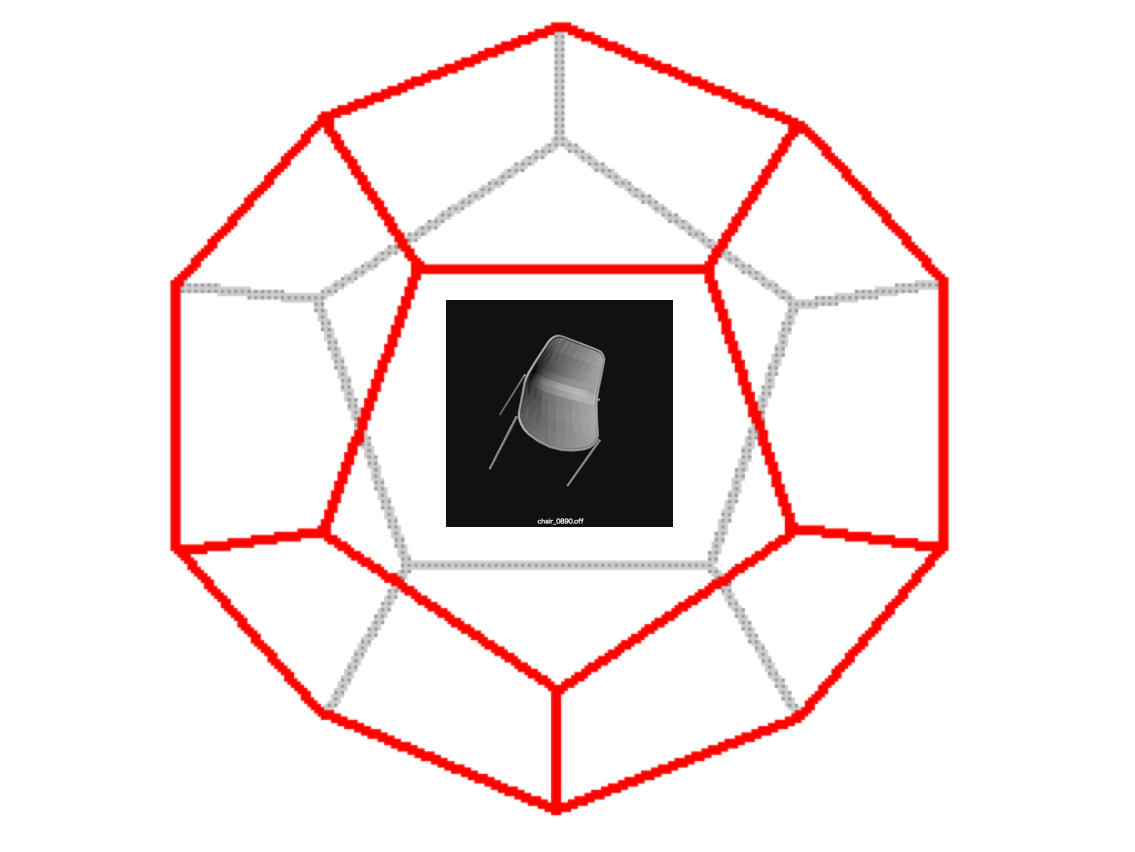
A regular dodecahedron placed centering around the centroid:
The 20 gray images converted from corresponding depth images:
It is worth noting that the number of the gray images which are inputs for the pre-trained CNN is 20 times as many as that of the 3D models.
the number of trainings the number of testings
3D model 3991 908
gray image ($\times$20) 79820 18160

Prediction Algorithm


 The following procedures are applied to the testing 3D models:
  1. A 3D model is loaded.
  2. It was scaled to such an appropriate size that all models have the same size.
  3. The centroid is calculated.
  4. A regular dodecahedron is placed centering around the centroid.
  5. 20 depth images (400$\times$400 pixels) are drawn by making the 20 vertices of the dodecahedron view points.
  6. The images are converted to gray images with the range [0,255].
  7. The 20 gray images are obtained per model.
  8. The above fine-tuned CNN is applied to the 20 gray images.
  9. The 20 labels are obtained.
  10. The resultant label is decided by majority vote.

Dataset for Caffe


 Caffe requires the following directories and files:
  1. a directory which contains training images
  2. a directory which contains testing images
  3. a text file in which names and labels of training images are described
  4. a text file in which names and labels of testing images are described
In this work they are referred to as "ModelNet10Train", "ModelNet10Test", "train.txt", and "test.txt,", respectively. The contents of "test.txt" are as follows:
desk_0234_depth_image_0.png 3
night_stand_0224_depth_image_0.png 6
chair_0904_depth_image_0.png 2
desk_0208_depth_image_0.png 3
bathtub_0127_depth_image_0.png 0
monitor_0528_depth_image_0.png 5
desk_0241_depth_image_0.png 3
dresser_0285_depth_image_0.png 4
sofa_0751_depth_image_0.png 7
dresser_0218_depth_image_0.png 4
....
The contents of "train.txt" are as follows:
chair_0190_depth_image_0.png 2
sofa_0138_depth_image_0.png 7
chair_0019_depth_image_0.png 2
dresser_0086_depth_image_0.png 4
table_0232_depth_image_0.png 8
sofa_0097_depth_image_0.png 7
night_stand_0040_depth_image_0.png 6
chair_0501_depth_image_0.png 2
chair_0766_depth_image_0.png 2
bed_0370_depth_image_0.png 1
...
After storing the images specified in "test.txt" and "train.txt" in the directories "ModelNet10Test" and "ModelNet10Train" respectively, this script is run to create a dataset for Caffe. "test_lmdb" and "train_lmdb" which are inputs for Caffe are output.

Definition of CNN


 The CNN model is defined in the file "train_val.prototxt" as The file is based on the file "bvlc_reference_caffenet/train_val.prototxt" that Caffe provides. The differences between the original and my own files exists in two layers, "data" and "fc8." In accordance with the interpretation in this page, parameters in the layer "3dobject_fc8" are modified as shown above.

Definition of Solver


 Based on the file "bvlc_reference_caffenet/solver.prototxt," the file used for fine-tuning the CNN is written as, The file is named "solver.prototxt."

Training


 This script is run to fine-tune the CNN model. The pre-trained model which Caffe provides is "bvlc_reference_caffenet/bvlc_reference_caffenet.caffemodel" which is passed to "caffe train" command as the argument of the "-weights." That script fine-tunes the pre-trained model by using the current dataset.

Result


 The x-axis indicates the iteration number and the y-axis the recognition accuracy. Because in the current case the total iteration number is 100,000 and the solver is designed to output the accuracy once per 1000 iterations, the maximum value of the x-axis is 100(=100,000/1000). The recognition accuracy reaches about 86%.

Construction of Classifier


 After training, a file "3dobject_train_iter_100000.caffemodel" is created. It is called a model file. The file contains the information on the fine-tuned CNN. In order to construct a classifier from the model file, the following file is also needed. That file is named "deploy.ptototxt." To get it, "train_val.prototxt" previously defined is modified according to the following procedures.
  1. Remove the layer "data," and add following four lines.
  2. Remove the layers "loss" and "accuracy", and add this layer.
The four lines with which the layer "data" is replaced means:
  1. input_dim: 20 --- batch size
  2. input_dim: 3 --- channel number
  3. input_dim: 227 --- width of an image
  4. input_dim: 227 --- height of an image
The code to classify the 3D models is implemented as follows: As described above, a 3D model yields 20 gray images. The fine-tuned CNN is applied to each of them and 20 labels are obtained per 3D model. The final label is decided by majority vote. This algorithm is evaluated on 3D models in the directory "ModelNet10Test." The number of them is 908 as shown above. The algorithm achieves 90.2% classification accuracy.

Comparison With Other Works


 The following table is quoted from the Princeton ModelNet page. The algorithm proposed here is not bad in spite of the simple procedures.
Algorithm Accuracy
VoxNet 92%
DeepPano 85.45%
3DShapeNets 83.5%
the proposed algorithm 90.2%

References

  1. D. Maturana and S. Scherer. VoxNet: A 3D Convolutional Neural Network for Real-Time Object Recognition. IROS2015.
  2. B Shi, S Bai, Z Zhou, X Bai. DeepPano: Deep Panoramic Representation for 3-D Shape Recognition. Signal Processing Letters 2015.
  3. Z. Wu, S. Song, A. Khosla, F. Yu, L. Zhang, X. Tang and J. Xiao. 3D ShapeNets: A Deep Representation for Volumetric Shapes. CVPR2015.
  4. Hang Su, Subhransu Maji, Evangelos Kalogerakis, and Erik Learned-Miller, Multi-view Convolutional Neural Networks for 3D Shape Recognition

2015年9月10日木曜日

Feature Extraction by CNN and Classification by SVM


Introduction


 In the previous page, I performed the scene recognition using the Convolutional Neural Network (CNN) that the library Caffe provides. In this page, for the same dataset the same CNN is used for extracting feature vectors and the classification is accomplished by means of the Support Vector Machine (SVM) in the library LIBLINEAR. The recognition accuracy reaches about 95% .

Feature Extraction


 The following code is used to extract feature vectors from the CNN and to convert them into the input format that LIBLINEAR requires. The format of training and testing data files for LIBLINEAR is the same as that for LIBSVM: Each line contains a label and a feature vector. I extracted feature vectors from the layer "fc7." Their dimension is 4096. The contents of the file "total_list_15_in_local_machine.txt" described in the above code are as follows: Each line consists of a file path, a label, and a phase ("train"/"valid"/"test"). In this work, two phases "train" and "valid" are merged into one phase "train." After executing the above python code, I got two files "libsvm_train_inputs.txt" and "libsvm_test_inputs.txt" which are input files for LIBLINEAR. The number of training images are 7560 and the number of testing images 1220.

Execution of SVM


 The following command is run to train a SVM. Then, this command is run to predict the categories. The recognition accuracy is about as much as that of the CNN.

2015年9月6日日曜日

Scene Recognition by Caffe


Introduction


 In this page, I perform a scene recognition by means of the library Caffe. It is shown that with the pre-training model that Caffe provides and its fine-tuning by scene images, the recognition accuracy achieves about 95% .

Computation Environment


 I used that instance g2.2xlarge in the Amazon EC2 which mounts the GPU device.

Dataset


 I trained the CNN using the dataset LSP15 in this page. The dataset consists of the 15 directories as follows:
  1. MITcoast
  2. MITforest
  3. MIThighway
  4. MITinsidecity
  5. MITmountain
  6. MITopencountry
  7. MITstreet
  8. MITtallbuilding
  9. bedroom
  10. CALsuburb
  11. industrial
  12. kitchen
  13. livingroom
  14. PARoffice
  15. store
The name of the directory represents the category of the scene. Each directory contains about 200 to 300 images which belong to their category.


Data Augmentation


 In order to augment dataset, I added the mirror images to it. Moreover, the images are split into two groups "train" and "test." The size of the image is 256 $\times$ 256, and the number of the channel is 3. The number of the images in each category is as follows:
                                   
label name number of train number of test
0 MITcoast 610 100
1 MIThighway 440 70
2 MITmountain 630 100
3 MITstreet 490 80
4 MITforest 550 90
5 MITinsidecity 520 80
6 MITopencountry 690 110
7 MITtallbuilding 600 100
8 bedroom 360 60
9 CALsuburb 400 60
10 industrial 520 80
11 kitchen 360 60
12 livingroom 490 80
13 PARoffice 360 60
14 store 540 90
7560 1220

Dataset for Caffe


 Caffe requires the following directories and files:
  1. a directory which contains training images
  2. a directory which contains test images
  3. a text file in which names and labels of training images are described
  4. a text file in which names and labels of test images are described
In my environment, they are put in the following paths:
  1. /home/ubuntu/data/caffe_256_15/train/
  2. /home/ubuntu/data/caffe_256_15/test/
  3. /home/ubuntu/data/caffe_256_15/train.txt
  4. /home/ubuntu/data/caffe_256_15/test.txt
The contents of the file "test.txt" are as follows:
MITstreet_image_0179_flipped.jpg 3
MITtallbuilding_image_0173_flipped.jpg 7
MITcoast_image_0126.jpg 0
store_image_0158_flipped.jpg 14
MITinsidecity_image_0102_flipped.jpg 5
MITforest_image_0200_flipped.jpg 4
industrial_image_0189_flipped.jpg 10
MITcoast_image_0142.jpg 0
kitchen_image_0019_flipped.jpg 11
bedroom_image_0210_flipped.jpg 8
bedroom_image_0116_flipped.jpg 8
livingroom_image_0008_flipped.jpg 12
kitchen_image_0051_flipped.jpg 11
MITstreet_image_0167_flipped.jpg 3
MITcoast_image_0315.jpg 0
....
The contents of the file "train.txt" are as follows:
industrial_image_0190.jpg 10
CALsuburb_image_0103_flipped.jpg 9
bedroom_image_0022_flipped.jpg 8
MITopencountry_image_0222.jpg 6
MITstreet_image_0040.jpg 3
MIThighway_image_0053_flipped.jpg 1
livingroom_image_0063_flipped.jpg 12
store_image_0106_flipped.jpg 14
industrial_image_0144.jpg 10
kitchen_image_0085_flipped.jpg 11
bedroom_image_0040.jpg 8
MIThighway_image_0088_flipped.jpg 1
industrial_image_0264.jpg 10
bedroom_image_0117_flipped.jpg 8
MITcoast_image_0021_flipped.jpg 0
...
After storing the images specified in the files "test.txt" and "train.txt" in the directories "test" and "train" respectively, this script is run to create the dataset for Caffe. "test_leveldb" and "train_leveldb" which are the inputs for Caffe are output as shown below.

Definition of CNN


 I defined the structure of the CNN in the file named "model/scene_recognition/train_val.prototxt" as: The file is based on the file "/home/ubuntu/buildspace/caffe-master/models/bvlc_reference_caffenet/train_val.prototxt." In the layers "data" and "fc8," there are differences between the original and my own files. I replaced the layer "fc8" with the new layer "scene_fc8." Moreover, in accordance with the explanation in this page, parameters in the layer "scene_fc8" were modified as shown above.

Definition of Solver


 Based on the file "models/bvlc_reference_caffenet/solver.prototxt," the text file used for training the CNN is defined as follows: The path of that file is "model/scene_recognition/solver.prototxt."

Training


 This script is run to train the CNN. The pre-training model which Caffe provides is "models/bvlc_reference_caffenet/bvlc_reference_caffenet.caffemodel" which is passed as the argument of the command option "-weights." The script fine-tunes the pre-training model by using the current dataset.

Result


The x-axis indicates the iteration number and the y-axis the recognition accuracy. Because in the current case the total iteration number is 80,000 and the solver is designed to output the accuracy once per 500 iterations, the maximum value of the x-axis is 160(=80,000/500). The recognition accuracy reaches about 95%.

Construction of Classifier


 After the training, the file "scene_train_iter_80000.caffemodel" is created. The file contains the information of the fine-tuned CNN. In order to construct the classifier from the model file, the following file is needed. That file is named "deploy.ptototxt." It is made from the file "model/scene_recognition/train_val.prototxt" according to the following procedures.
  1. Remove the layer "data," and add the four lines as shown below.
  2. Remove the layers "loss" and "accuracy", and add this layer.
The four lines with which the layer "data" is replaced means:
  1. input_dim: 20 --- batch size
  2. input_dim: 3 --- channel number
  3. input_dim: 227 --- width of an image
  4. input_dim: 227 --- height of an image
The code to classify the image is implemented as follows: It is named "classifier.py." Now I can classify the images.

2015年9月2日水曜日

Caffeによるシーン認識(8分類問題)2


はじめに


 先のページで caffeを使ってシーン認識(8分類問題)を試みた。今回は、caffe が提供する pre-training モデルを用いて、同じ問題を考察する。

計算機環境


 AmazonのEC2を利用した。インスタンス名は g2.2xlarge である。GPUを搭載したマシーンである。

データセット


 データセットは前回と同じである。ただし、pre-trainingモデルに合わせるため、画像サイズを256$\times$256に、チャンネル数を3に変更した。

caffe用データの作成


 ここも前回と同じである。 以下のコマンドにより caffe 用の入力データを作成する。 前回はグレー画像を扱ったのでコマンドオプションに -gray を付けたが、今回は3チャンネルなので -gray は付けない。

ネットワークの設計


 caffeのソースコードを納めたディレクトリ
/home/ubuntu/buildspace/caffe-master/models/bvlc_reference_caffenet
にある train_val.prototxt を下敷きにして以下のようなネットワーク構造を定義した(model/scene_recognition/train_val.prototxt)。 変更部分は、data 層と fc8 層の2つである(fc8 層を scene_fc8 層に置き換えた)。 また、このページの解説に従って、scene_fc8 層のパラメータ lr_mult を変更した。

solverの作成


 訓練を行なうためのテキストファイル model/scene_recognition/solver.prototxt を以下のように記述した。caffe の提供するサンプルファイル(models/bvlc_reference_caffenet/solver.prototxt)を下敷きにした。 現在の test 画像の枚数は730枚、batch size を10としたので73(=test_iter)回で一通り画像を走査することになる。また、testの実行はtrainを500(=test_interval)回まわすごとに行なうようにした。

訓練


 以下を実行する。 コマンドオプション -weights の引数として与えられている models/bvlc_reference_caffenet/bvlc_reference_caffenet.caffemodel がcaffeが提供するpre-trainingモデルである。上記のコマンドにより、大規模データであらかじめ作られた pre-training モデルを、私のデータで fine-tuning することができる。

結果


 以下に結果を示す。
test画像:
train画像:
縦軸はaccuracy(正解率)、横軸は iteration(繰り返し数)である。いまの場合、繰り返し数の総数が44238である。500回ごとにtest画像でテストするようにしたので、test画像の結果の横軸は89(=44238/500)まで表示されている。一方、 trainに対しては、73(=display)回ごとに出力するようにしたので、607(=44238/73)個の結果が表示されている。前回、test画像に対する正解率は88%であったが、今回は97%となり大幅に改善していることが分る。

検出器の作成


 ここまでの計算で、ファイル scene_train_iter_40000.caffemodel ができている。ここには、fine-tuning によりパラメータの確定したネットワーク構造が納められている。このファイルから検出器を作るには、以下のようなdeploy.prototxt ファイルが必要である。 これは、先に定義した model/scene_recognition/train_val.prototxt のデータ層を取り除き を追加し、最終層にある loss 層と accuracy 層を取り除き を追加したものである。データ層の代わりに挿入した input_dim の意味は以下の通りである。
  1. input_dim: 10 --- バッチサイズ
  2. input_dim: 3 --- 入力画像のチャンネル数
  3. input_dim: 227 --- 入力画像の幅
  4. input_dim: 227 --- 入力画像の高さ
検出器を使って、ファイルを識別するコードを以下に示す。 実行するとこうなる。 パーフェクトである。

2015年7月30日木曜日

Caffeによるシーン認識(8分類問題)


はじめに


 先のページで theano を使ってシーン認識(8分類問題)を試みた。今回は、caffe を取り上げ、同じ問題に適用する。

計算環境


 AmazonのEC2を利用した。インスタンス名は g2.2xlarge である。GPUを搭載したマシーンである。

データセット


 データセットは前回と同じである。
                     
ラベル 名前 枚数(train) 枚数(test)
0 MITcoast 610 100
1 MIThighway 440 70
2 MITmountain 630 100
3 MITstreet 490 80
4 MITforest 550 90
5 MITinsidecity 520 80
6 MITopencountry 690 110
7 MITtallbuilding 600 100
4530 730

これまでと同様に左右反転画像を追加してある。theano を用いた時は、データセットを train / validation / test の3つに分けたが、今回は train と validation を1つにまとめ改めて train とした。また、画像サイズは 126$\times$126 に変更し、画像の枚数も10で割り切れるよう調節した。

caffe用データの作成


 caffeが必要とするものは以下の4つである。
  1. train 画像を納めたディレクトリへのパス
  2. test 画像を納めたディレクトリへのパス
  3. train 画像名とラベルを記したテキストファイル
  4. test 画像名とラベルを記したテキストファイル
実行環境では、以下の場所にディレクトリとテキストファイルを作成した。
  1. /home/ubuntu/data/caffe/train
  2. /home/ubuntu/data/caffe/test
  3. /home/ubuntu/data/caffe/train.txt
  4. /home/ubuntu/data/caffe/test.txt
テキストファイルには、各行にファイル名とラベルを記述する。各ファイルの中身は以下の通りである。
test.txt
MITtallbuilding_image_0332_flipped.jpg 7
MITopencountry_image_0195.jpg 6
MITstreet_image_0176_flipped.jpg 3
MITmountain_image_0042.jpg 2
MITcoast_image_0195.jpg 0
MITmountain_image_0063_flipped.jpg 2
MITopencountry_image_0366_flipped.jpg 6
MITmountain_image_0229.jpg 2
MITtallbuilding_image_0354_flipped.jpg 7
MITforest_image_0086.jpg 4
MITcoast_image_0085.jpg 0
MITstreet_image_0094.jpg 3
MITopencountry_image_0401.jpg 6
MITmountain_image_0025_flipped.jpg 2
MITcoast_image_0075_flipped.jpg 0
MITforest_image_0227_flipped.jpg 4
....
train.txt
MITstreet_image_0253_flipped.jpg 3
MITcoast_image_0023.jpg 0
MITstreet_image_0256_flipped.jpg 3
MIThighway_image_0228_flipped.jpg 1
MITopencountry_image_0045_flipped.jpg 6
MITmountain_image_0314.jpg 2
MITtallbuilding_image_0078.jpg 7
MITmountain_image_0337.jpg 2
MITforest_image_0120.jpg 4
MITcoast_image_0088.jpg 0
MITmountain_image_0211_flipped.jpg 2
MITforest_image_0133_flipped.jpg 4
MITcoast_image_0356.jpg 0
MIThighway_image_0081_flipped.jpg 1
MITcoast_image_0115_flipped.jpg 0
MITmountain_image_0218_flipped.jpg 2
MITforest_image_0196_flipped.jpg 4
MITforest_image_0281_flipped.jpg 4
...
ディレクトリ内にテキストファイルに記述した画像を納め、以下のコマンドにより caffe 用の入力データを作成する。 以下の場所にデータベース test_leveldb と train_leveldb が出力される。

ネットワークの設計


 ここでは、caffeのサンプル(caffe-master/examples/mnist/lenet_train_test.prototxt)を下敷きにして以下のようなネットワーク構造を定義した(scene_train_test.prototxt)。

solverの作成


 訓練を行なうためのテキストファイル scene_solver.prototxt を以下のように記述する。caffe の提供するサンプルファイル(caffe-mater/examples/mnist/lenet_solver.prototxt)を下敷きにした。 現在の test 画像の枚数は730枚、batch size を10としたので73回で一通り画像を走査することになる。従って、73回ごとに正解率を出力するようにした。

訓練


 以下を実行する。

結果


 以下に結果を示す。
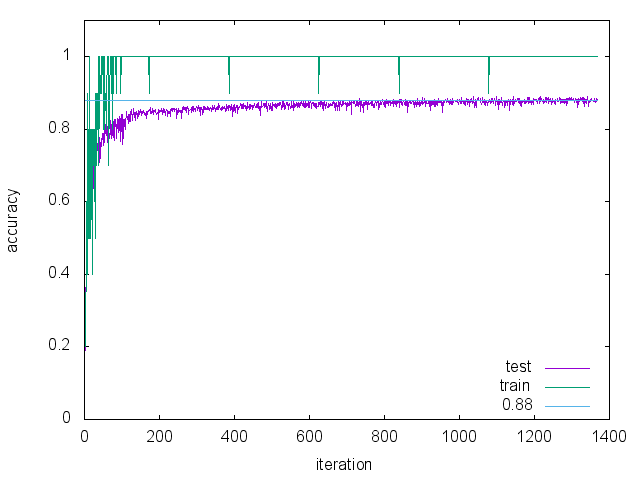
縦軸はaccuracy(正解率)、横軸は iteration(繰り返し数)である。いまの場合73回に1回ずつaccuracyを出力するので1370(=100000/73=1369.86...)個の値がプロットされる。 訓練画像については100%の正解率、テスト画像については88%程度の正解率である。

検出器の作成


 ここまでの計算で、ファイル snapshot_iter_100000.caffemodel ができている。ここには、訓練によりパラメータの確定したネットワーク構造が納められている。このファイルから検出器を作るには、以下のようなdeploy.prototxt ファイル(ここではscene_deploy.prototxtとした)が必要である。 これは、先に定義した scene_train_test.prototxt のデータ層を取り除き を追加し、最終層にある loss 層と accuracy 層を取り除き を追加したものである。データ層の代わりに挿入した input_dim の意味は以下の通りである。
  1. input_dim: 10 --- バッチサイズ
  2. input_dim: 1 --- 入力画像のチャンネル数
  3. input_dim: 126 --- 入力画像の幅
  4. input_dim: 126 --- 入力画像の高さ
検出器を使って、ファイルを識別するコードを以下に示す。 実行するとこうなる。1つ間違えている。

2015年4月29日水曜日

boost/range/adaptor 覚え書き

出力は以下の通り。

2015年4月2日木曜日

Convolutional Neural Network によるシーン認識


はじめに


 先のページで Convolutional Neural Network(CNN)を解説した。今回は、CNN をシーン認識に適用した結果を示す。

データセット


 このページに置いてある データ(LSP15)を使用した。このデータは15個のディレクトリから構成される。
  1. bedroom
  2. CALsuburb
  3. industrial
  4. kitchen
  5. livingroom
  6. MITcoast
  7. MITforest
  8. MIThighway
  9. MITinsidecity
  10. MITmountain
  11. MITopencountry
  12. MITstreet
  13. MITtallbuilding
  14. PARoffice
  15. store
各ディレクトリ内にはその名前が表すシーンの画像が複数枚おさめられている。 今回のシーン識別では「MIT」の付くディレクトリだけを利用した。画像の大きさが統一されており扱い易かったからである。今回あつかう問題は8分類問題である。

データセットの増量


 各シーンの画像の枚数は以下の通りである。

シーン名 枚数
MITcoast360(720)
MIThighway260(520)
MITmountain374(748)
MITstreet292(584)
MITforest328(656)
MITinsidecity308(616)
MITopencountry410(820)
MITtallbuilding356(712)
総数2688(5376)

画像の枚数を増やすため、各画像の左右反転画像を追加した。括弧内が追加後の枚数である。

データセットの分割


 データセットを train、validation、test の3つに分割する。枚数の比を train : validation : test = 5 : 1 : 1 とした。 以下に具体的な枚数を示す。
 
ラベル名 シーン名 train validation test
0MITcoast514102102
1MIThighway3717474
2MITmountain534106106
3MITstreet4178383
4MITforest4689393
5MITinsidecity4408888
6MITopencountry585117117
7MITtallbuilding508101101
総数3837764764

また、シーン認識時に使用するラベルを上図の第1列のように定義した。 左右反転画像は元の画像とは独立した画像として扱い、train / validation / test の3つに分ける際は乱数を用いた。

ネットワークの構造


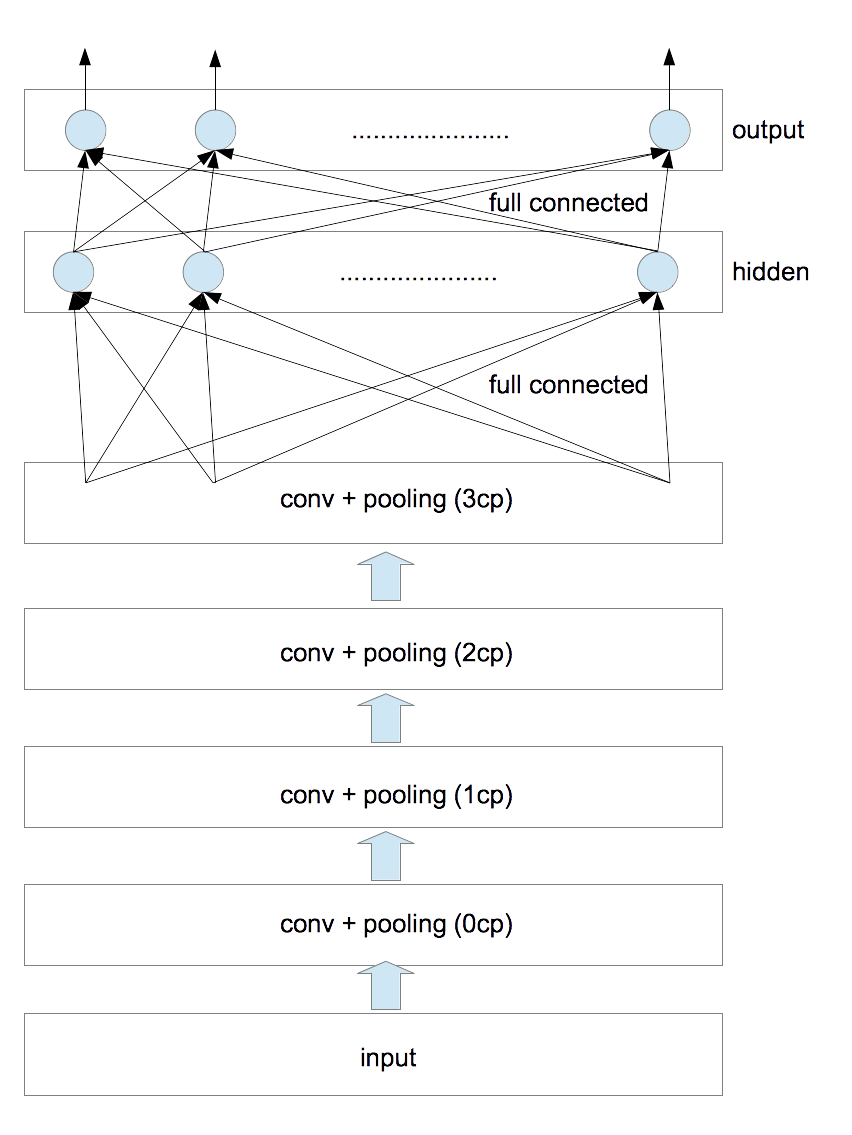
 今回使用したネットワークの構造は以下の通りである。
convolutional 層と pooling 層の対を4つ、隠れ層を1つとした。 各種パラメータは以下の通りである。
           
層名 フィルタサイズ フィルタの個数 pooling
0cp 5$\times$5 2 2$\times$2
1cp 6$\times$6 10 2$\times$2
2cp 6$\times$6 50 2$\times$2
3cp 5$\times$5 200 2$\times$2

フィルタサイズとは、convolution 時に使用する矩形画像のサイズのことである(フィルタの各要素の値は訓練時に決定される)。また、convolution時の stride は全て1とした。poolingはmax poolingを採用した。poolingのあと画像サイズは縦横ともに1/2になる。 隠れ層と出力層のユニット数は以下の通りである。
         
層名 ユニット数
隠れ層500
出力層8

各層における画素数の変遷は次のようになる。
           
層名 入力サイズ conv後のサイズ pooling後のサイズ
0cp 146$\times$146 142$\times$142 71$\times$71
1cp 71$\times$71 66$\times$66 33$\times$33
2cp 33$\times$33 28$\times$28 14$\times$14
3cp 14$\times$14 10$\times$10 5$\times$5

0cp層への入力画像に対しては、画素値を255で割ったあと、平均値が0、分散が1となるように正規化した。 3cp層から出力される画素の数は5000=(5$\times$5$\times$200)である。これが隠れ層への入力値となる。今考えているラベルの総数は8であるから出力層のユニット数は8となる。

計算方法


 Convolutional Neural Networks (LeNet) にあるサンプルソース(theanoによる実装)に手を加え計算を行なった。主な変更点は以下の通りである。
  1. 上に示したネットワーク構造に変更した。
  2. $L_1$正則化項と$L_2$正則化項を追加した。
  3. 各epochごとに学習率が減衰していくようにした。
  4. 隠れ層の活性化関数をsigmoidとした(tanhより精度が良くなった)。
正則化項についてはこちらで説明した。 パラメータは以下の通りである。
   
学習率減衰率 $L_1$正則化項の重み $L_2$正則化項の重み
0.01 0.995 0.0002 0.0002

元のソースでは、early-stoppingと呼ばれる手法を使って訓練を行っている。「訓練データ(train)で学習したあと検証データ(validation)で誤り率を見る」を、検証データで改善が見られなくなるまで繰り返す手法である。この部分はそのまま踏襲した。

計算環境


 アマゾンのEC2インスタンス(g2.2xlarge)を利用した。これは1536CUDA コアと 4GB のビデオメモリを搭載しており、今回の計算ではtheanoを通してGPUを利用した。

結果


 0/1損失(0/1 loss)の結果を以下に示す。
   
best validation score test performance
11.9736842105%10.6578947368%

ここで、best validation score とは、early-stopping の反復計算の過程で得られた「検証データ」に対する最適値である。 「検証データ」に対する最適値を実現したときのモデルを使って「テストデータ」を評価した結果が test performance である。 ただし、反復時の epoch 数の上限値を500とした。計算時間は 182.905974067 分であった。

考察

  1. 左右反転画像を追加する前の誤り率は20%程度であり、これ以上減らすことができなかった。
  2. 左右反転画像を追加した後の誤り率は10%程度となり改善された。
  3. 白色化や隠れ層の追加などを試みたがこれ以上は改善しなかった。
  4. なんとかして誤り率を一桁にしたいのだが。。。